All posts tagged: apple

Everything You Need to Know About Apple watchOS 27

Everything You Need to Know About Apple watchOS 27

Apple has unveiled watchOS 27 beta 1, offering developers an early glimpse into the latest iteration of its smartwatch operating system. With the public beta anticipated in July, this update introduces a range of new features, refined functionalities, and compatibility changes. However, as with any beta software, it comes with its share of bugs and incomplete elements. Here’s a detailed look at what watchOS 27 brings to the table. The video below from Zollotech gives us more details on the new watchOS.   Device Compatibility: A Shift Toward Newer Models watchOS 27 marks a significant transition by focusing exclusively on newer Apple Watch models, leaving older devices behind. Supported models include: Apple Watch SE 3 Series 9, 10 and 11 Ultra 2 and Ultra 3 To install watchOS 27, your Apple Watch must be compatible and your iPhone must be running iOS 27 beta 1. This shift underscores Apple’s commitment to using the hardware capabilities of its latest devices, but it also means users of older models will remain on watchOS 26, signaling the end …

Apple Shares Massive List of Over 250 Changes Across iOS 27, macOS Golden Gate, and More

Apple Shares Massive List of Over 250 Changes Across iOS 27, macOS Golden Gate, and More

During its WWDC 2026 keynote on Monday, Apple briefly showed a slide with hundreds of new features and enhancements coming across iOS 27, macOS 27 Golden Gate, watchOS 27, tvOS 27, and visionOS 27. All of the software updates are currently available as developer betas, and they are expected to be released to all users in September. We already highlighted some of the key new features from the slide, and now we have shared a categorized list of all of the more than 250 changes shown. iPhone & iOS 27 & iPadOS 27 Switch between two iPhone devices with the same phone number More seamless transitions between Wi-Fi and cellular networks Live Activities in Dynamic Island in landscape Enhanced power efficiency for Safari in iOS Faster Voice Control response in iOS Extra-large widgets in iOS Streamlined setup for Touch Accommodations in iOS and iPadOS Live Activity for Precision Finding with Friends Smoother scrolling in App Library Smoother unlocking on iPhone Undo and redo Home Screen edits in iPadOS Extra-large widgets in Today View in iPadOS …

Everything announced at Apple WWDC 2026 – including Siri, iOS 27 dev beta, and more

Everything announced at Apple WWDC 2026 – including Siri, iOS 27 dev beta, and more

By Radhika Rajkumar, Senior Editor, / June 8 at 1:49 p.m. ET Mike Rockwell, VP of Siri engineering, said “we’ve rebuilt Siri with powerful AI at the core,” introducing Siri AI, a blend of Siri and Apple Intelligence. Users can access the new Siri by saying “Hey Siri” as always, but now it will be a “profoundly more capable assistant” you can converse with, including via a new dedicated Siri app. It’s in Spotlight on MacOS, and Visual Intelligence is here too.  In a demo, Rockwell showed Siri drawing on current public information to answer a question about a local concert, with the answer displayed on Rockwell’s home screen. With on-screen awareness and using personal context, Siri can identify a location from a photo you’ve pulled up and answer follow-up questions related to the location, including directions, for which Siri opens Apple Maps to display.  For the last demo, Rockwell told Siri to share only select photos featuring certain people in a family group chat. Another demo showed Siri handling more than one-off tasks, going …

The MacRumors Show: Siri AI, Apple Intelligence in Apps, and More at WWDC 2026

The MacRumors Show: Siri AI, Apple Intelligence in Apps, and More at WWDC 2026

On this week’s special episode of The MacRumors Show, we talk through all of the major announcements Apple unveiled at WWDC 2026, including Siri AI, new Apple Intelligence features in apps, and system-wide performance and design improvements. Apple framed the keynote around three areas: platform improvements, Trust and Safety, and a sweeping overhaul of ‌Apple Intelligence‌ and ‌Siri‌. Developer betas of all six operating systems are available now, with a public beta expected in July and a general release in September. Liquid Glass received a series of improvements in response to user feedback, with Apple reworking the foundations of how the translucent design language is constructed to deliver more uniform refraction and improved contrast. A new system-wide opacity slider lets users dial transparency anywhere from completely clear to fully tinted. App icons also gain sharper definition with additional layering. macOS Golden Gate receives the same Liquid Glass refinements with particular attention to the transparency and shadow issues most pronounced on the Mac. A significant chunk of the keynote was devoted to performance improvements across all …

Apple vs Samsung: The 2026 Foldable Phone War

Apple vs Samsung: The 2026 Foldable Phone War

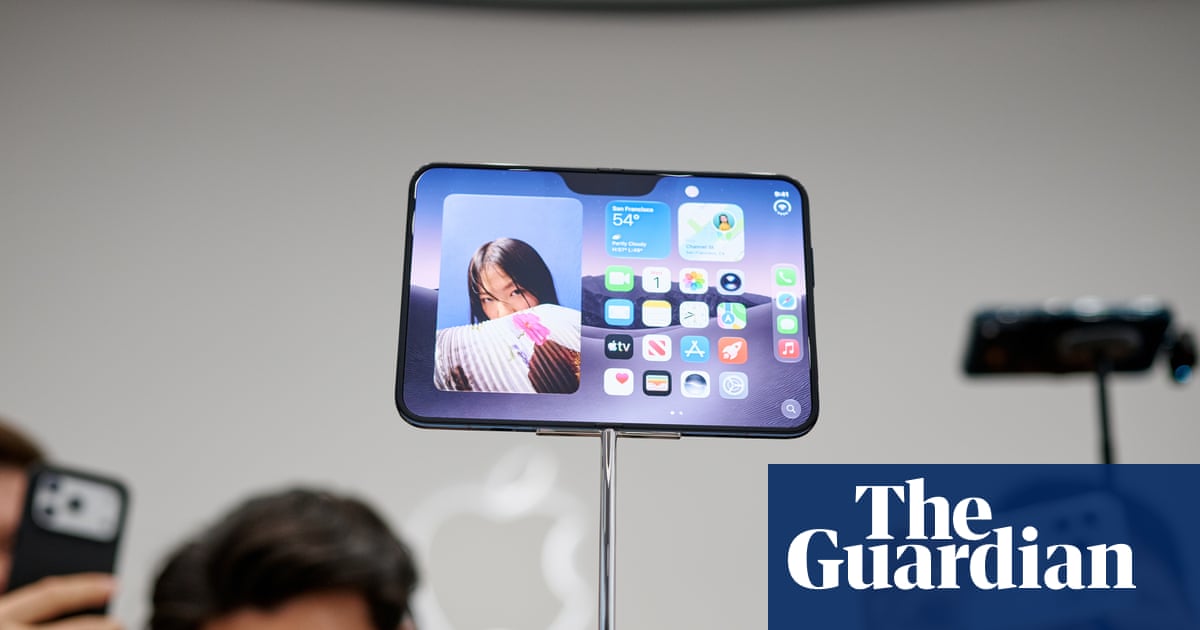
Apple is poised to make a significant leap into the foldable phone market with the anticipated launch of the iPhone Ultra Fold in 2026. This move positions Apple as a direct competitor to Samsung, the current leader in foldable technology. By combining advanced engineering with Apple’s renowned design philosophy, the iPhone Ultra Fold is set to challenge existing standards and potentially accelerate the adoption of foldable devices. Here’s an in-depth look at what this new device promises to deliver. Release Timeline and Pricing Strategy The iPhone Ultra Fold is expected to debut alongside the iPhone 18 series in 2026. However, due to the complexities of manufacturing foldable devices, its release may be delayed until late December of that year. Analysts estimate the starting price to be approximately $2,000, placing it in direct competition with Samsung’s Galaxy Z Fold series. Despite the premium price point, Apple is projected to secure a substantial 22% share of the foldable phone market within its first year. This forecast reflects the brand’s strong consumer loyalty and the growing interest in …

Best iPad Accessories (2026): Keyboards, Cases, Styli

Best iPad Accessories (2026): Keyboards, Cases, Styli

Other iPad Accessories We Like iPad accessories are endless. Here are some other options that are perfectly fine, though some have issues that knock them down a rung. Zagg Pro Keys 2 Photograph: Brenda Stolyar Zagg Pro Keys 2 Keyboard Case for $150: Zagg’s case (7/10, WIRED Review) isn’t as elegant as Logitech’s system, but you can connect it via Bluetooth to two different devices. That means you’ll need to recharge the keyboard case via USB-C. It’s more protective, thanks to the folio cover, and it’s a detachable system with a case that’s separate from the slate. But it’s also a lot bulkier. The second-generation version doesn’t come with a trackpad either, so you’ll have to supply your own mouse. This one is only available for the iPad Pro (M4), but you can still purchase the first-gen version for the ninth-gen iPad, iPad Air (including the 11-inch iPad Air with M2), and 11-inch iPad Pro, as well as the 12.9-inch iPad Pro. ESR Rebound Case for $120: When I was gifted the iPad Pro (M4) …

Best Laptops For College Students (2026): MacBooks and Beyond

Best Laptops For College Students (2026): MacBooks and Beyond

College laptops don’t have to be embarrassing. Nor do they have to be overly expensive. There are a lot of great laptops for college students that combine long battery life, easy portability, and the performance needed for everyday coursework in a great design. I’ve been reviewing laptops for over a decade and have tested hundreds over the years, and if someone asked me what to buy, these are the options I’d suggest. Be sure to check out our other computing guides, including the Best Laptops, Best Budget Laptops, Best MacBooks, Best Windows Laptops, Best Gaming Laptops, Best Chromebooks, and Best Laptop Bags. The Best Overall College Laptop The MacBook Air is my choice for best overall laptop. It’s the one almost everyone should buy. But college students have different needs—and in most cases, different budgets. It needs to be affordable, but ideally it should also be lightweight and easy to carry around. The MacBook Neo fits the bill perfectly. It’s only 2.7 pounds and starts at just $599. It also has a smaller display, which …

Apple Struck the Right Notes With Its New AI Tools. Here Are 4 Features I’m Excited to Try

Apple Struck the Right Notes With Its New AI Tools. Here Are 4 Features I’m Excited to Try

Apple was expected to go heavy on AI and Siri at Worldwide Developers Conference 2026, and it did. The new Apple Intelligence and Siri AI features are promising. I had low hopes of finding actual use of AI in my daily life, though. Event after event, I’ve sat through keynotes that throw AI features I’ll never use at me. Sure, I can use AI tools to generate a video from a prompt or my phone can book me an Uber with a voice command, but I don’t have much use for AI slop videos and booking a cab takes forever. I was bracing myself for another bombardment, but Apple got the AI pitch right at WWDC 26, showing ways to use its AI features that I could relate to.  For example, I’ve always wanted easier ways to add Shortcuts on my iPhone and wished I could change the framing of my photo while editing it. Apple isn’t telling me to use my phone in new ways, but it is aiming to simplify the things I already do. I’ve …

Apple Updates App Store Guidelines With Stricter Rules for Low-Quality Apps

Apple Updates App Store Guidelines With Stricter Rules for Low-Quality Apps

Apple updated its App Store Review Guidelines this week, adding stricter language around low-quality apps. The 4.3 Spam rule already barred overly simple apps in saturated categories, but Apple now includes language saying low-effort apps could be pulled from the App Store. Apps in oversaturated categories that are not updated, improved, or do not attract customers may be removed, according to Apple. App Guideline 4.3(b) New Language: Don’t submit apps that are indistinguishable from what’s already widely available. Opportunistically creating variants of existing app categories or popular apps degrades App Store discovery, reduces overall app quality, and harms both users and developers. Certain kinds of apps, such as dating, flashlight, sound effects, wallpaper, simple timers, and fortune telling, are well established on the App Store and we will not accept new submissions unless they offer a meaningfully different or improved experience. We may remove these apps from the App Store going forward if they are not updated, improved, or do not attract customers. Other kinds of apps, such as drinking games, Kama Sutra, fart, and …

I repurposed 4 old Apple devices, and now they all do something useful in my home

I repurposed 4 old Apple devices, and now they all do something useful in my home

Apple hardware tends to stick around. The build quality is good enough that these devices don’t break — they just get slower, lose software support, and eventually end up in a desk drawer because something newer replaced them. I had four of them in exactly that situation: a first-gen iPad Pro, a 9th-generation iPad, a 7th-gen iPod Touch, and a 2017 MacBook Air. All functional. All ignored. Rather than sell them for whatever eBay or Facebook Marketplace would offer — which isn’t much once the scratches and years of use are factored in — I found specific jobs for each one. Every device is still in active daily or weekly use, doing something genuinely useful. Here’s what each one does now. iPad Pro (1st gen) — portable second display and smart home hub Two jobs, one screen This 12.9-inch iPad does two completely different jobs depending on where I am. When I’m traveling with my MacBook Pro, it comes along as a secondary display via Sidecar. Wired beats wireless here — the connection stays solid, …